IPv6 Address Configuration
SLAAC and the role of Router in IPv6 networks
Carsten Strotmann
Created: 2025-01-27 Mon 20:12
Agenda
- The role of router in IPv6 networks
- SLAAC Addressing Problems
- IPv6 Privacy Extensions
- Stable Privacy-Enhanced Addresses
The role of router in IPv6 networks
IP-Addresses for hosts in an IPv6 world
- In IPv6 networks, it is perfectly fine …
- For one interface to have multiple IPv6 addresses (possibly from different prefixes)
- One network segment to have multiple routers
- Redundant for the same network prefix or
- Routers announcing different prefixes
- One host to have more than one gateway addresses (default route)
The role of router
- Routers play a central role in managed IPv6 networks
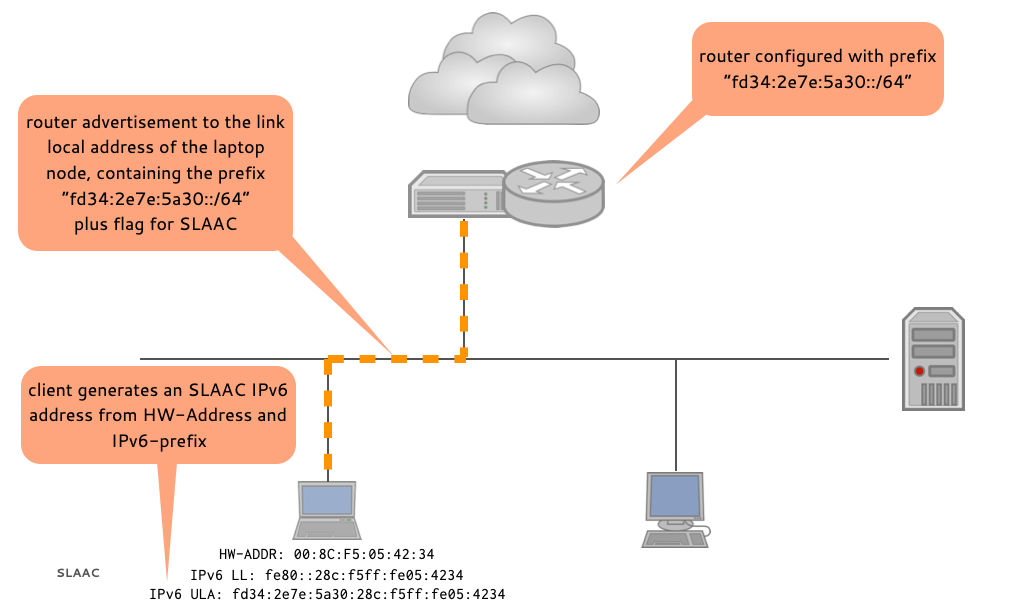
- The routers advertise:
- Available network prefixes and their lifetimes
- Gateway addresses
- Address configuration policy (SLAAC, DHCPv6)
- IPv6 implements “fate sharing” for gateway addresses (RFC 5505 - Principles of Internet Host Configuration)
Router advertisements (RA)
- An IPv6 node sends a router solicitation to the all-routers
address:
ff02::2. - Routers reply with “router advertisement” messages, unicasted to
the node's LLA (link-local
fe80::/10address). - Router send router advertisement (RA) messages periodically to
the all-nodes address:
ff02::1.
IPv6 Address Configuration
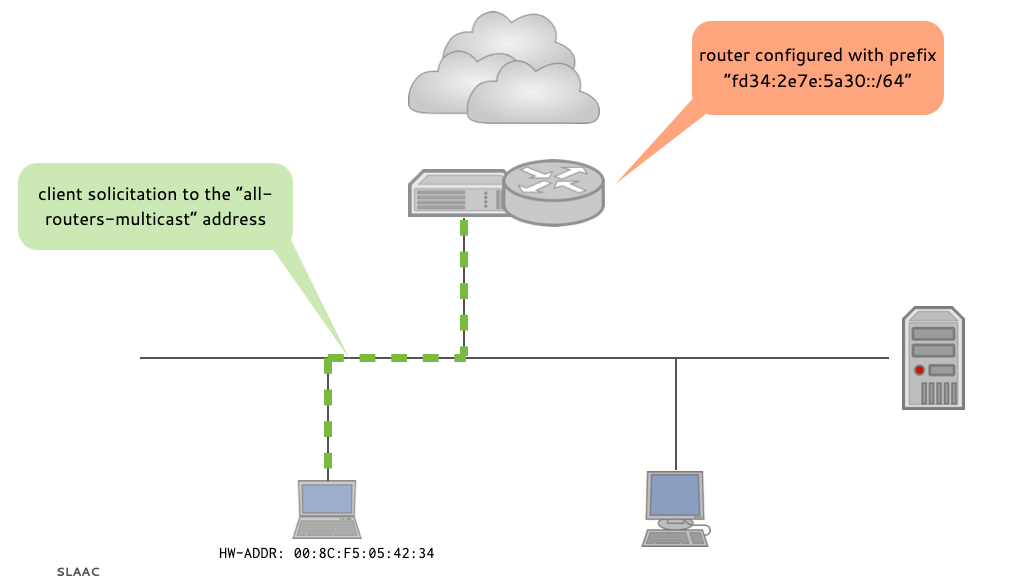
IPv6 Address Configuration
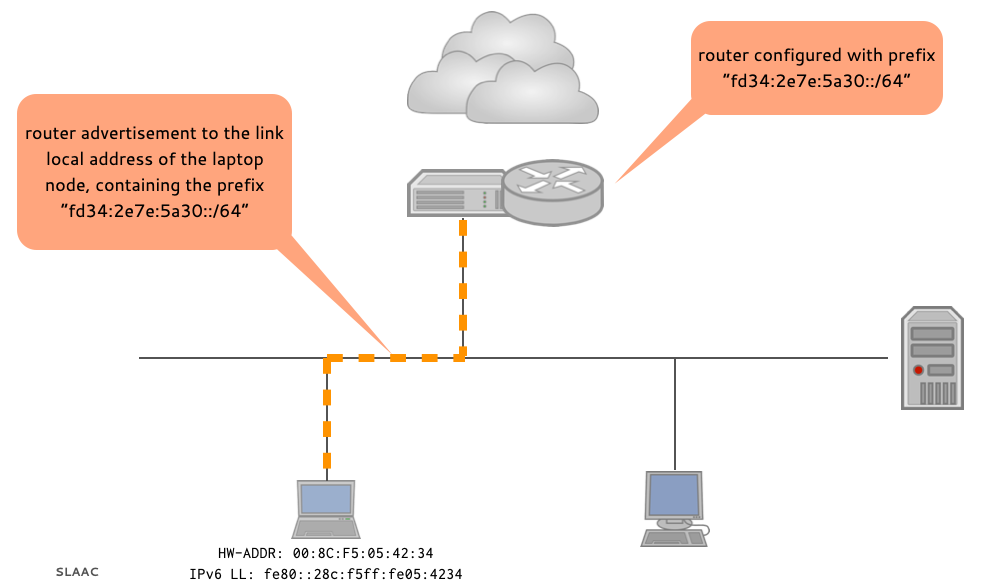
IPv6 Address Configuration
Router Advertisement
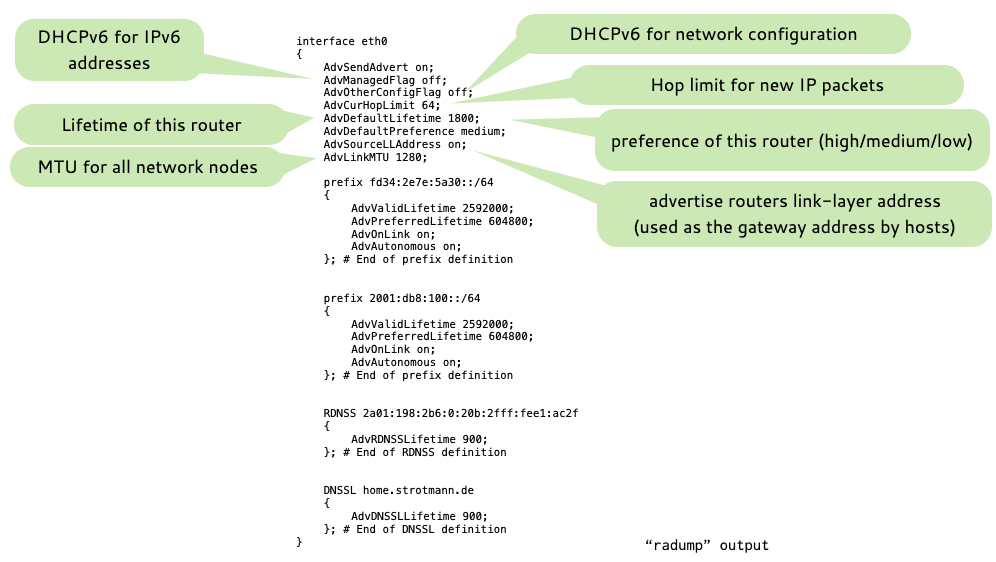
Router Advertisement
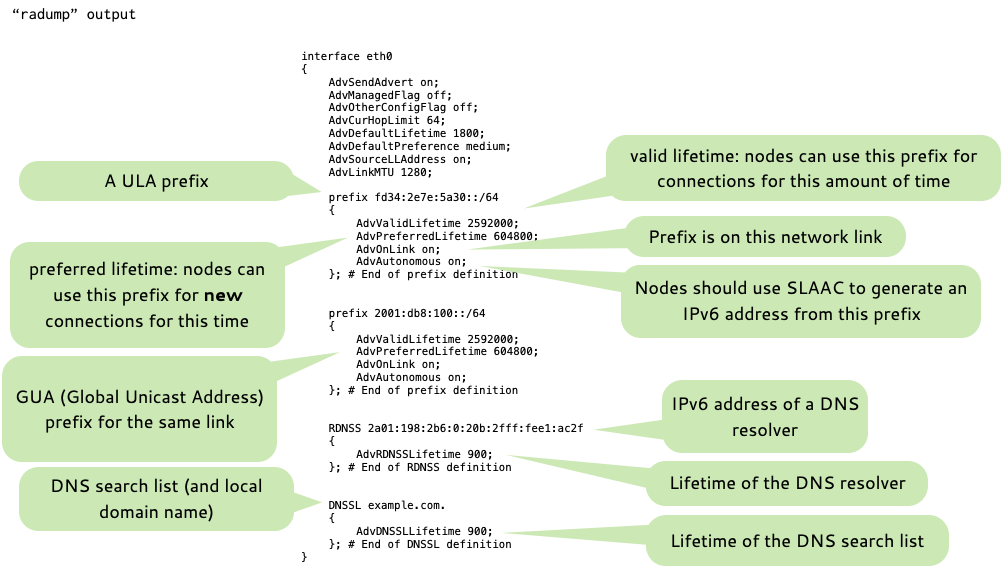
Router Advertisements
- RDNSS and DNSSL (RFC 8106 “IPv6 Router Advertisement Options for DNS Configuration”) is not supported on Microsoft Windows OS
before Windows 10
- Therefore networks with Windows clients require DHCPv6 for DNS resolver configuration.
- RDNSS and DNSSL works on Windows 10+, BSD, Linux, macOS, Android and Apple iOS
IPv6 Address Configuration variants
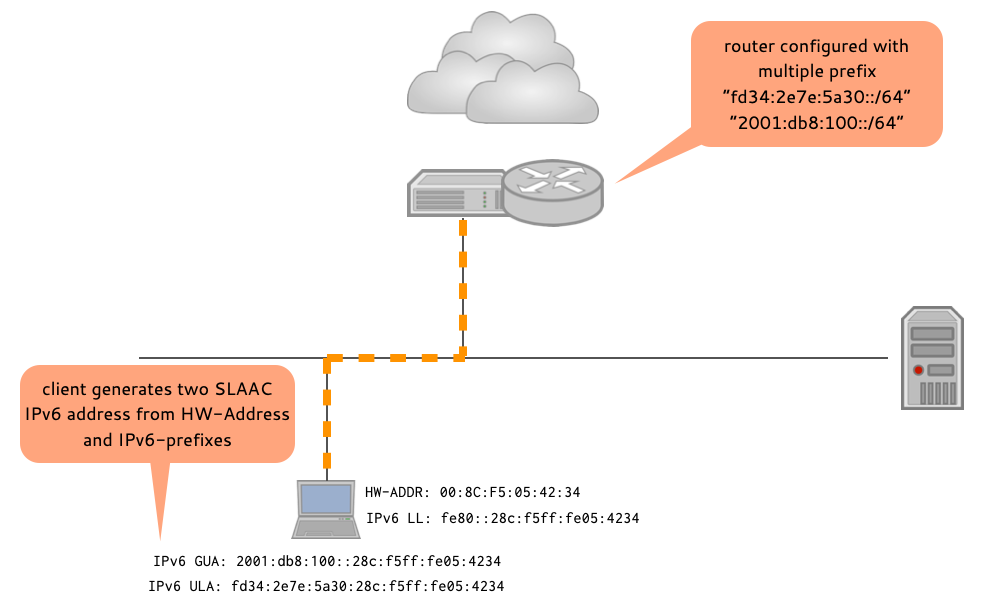
IPv6 Address Configuration variants
- Two router with the same prefix
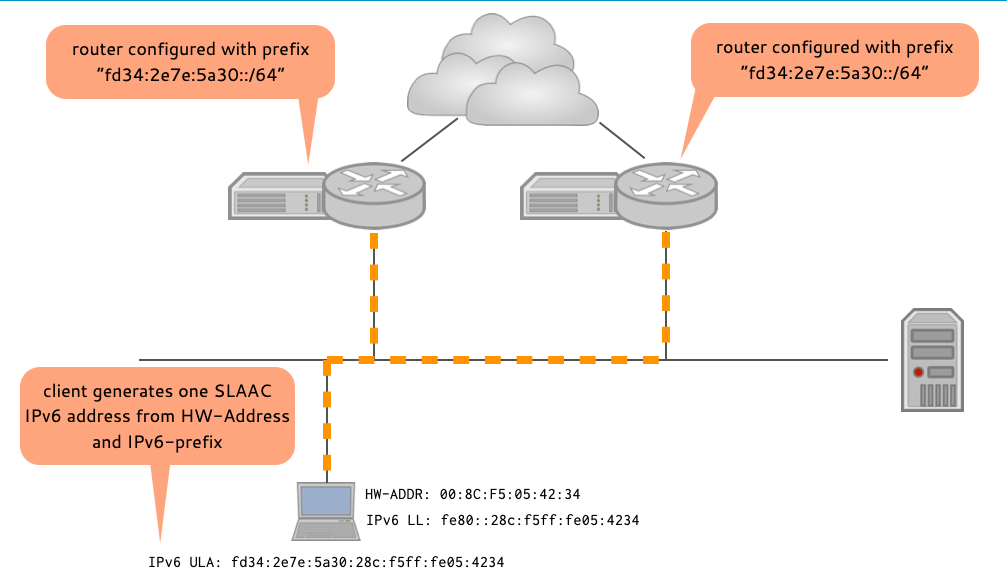
IPv6 Address Configuration variants
Two router with different GUA prefixes
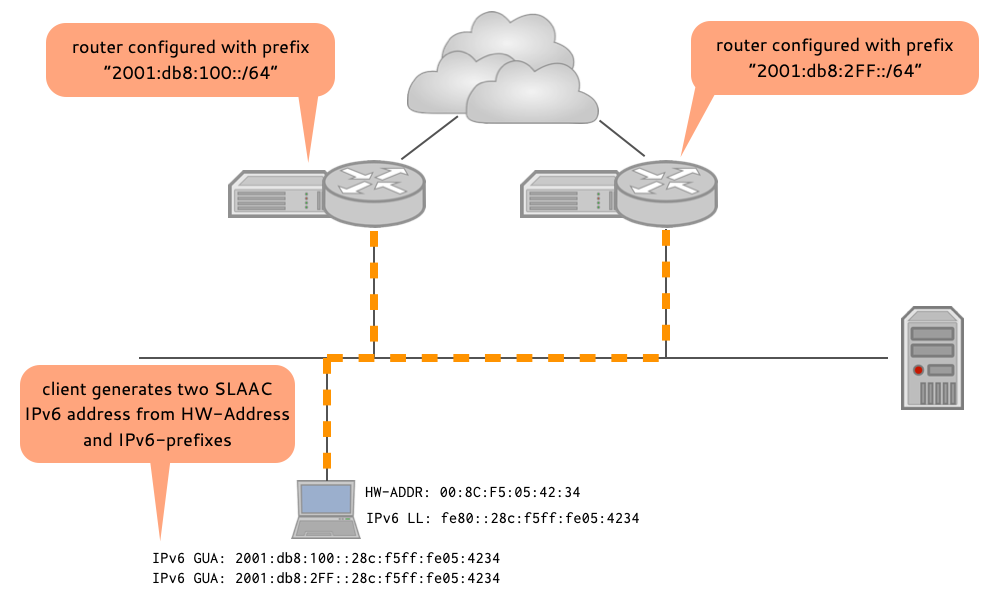
SLAAC Addressing Problems
Stateless Address Autoconfiguration (SLAAC) for IPv6
- Originally SLAAC results in hosts configuring one or more stable addresses composed of a network prefix advertised by a local router, and an Interface Identifier (IID) that typically embeds a hardware address (e.g., an IEEE LAN MAC address)
Problems with stable IPv6 addresses created from hardware information (1)
- Because these Interface Identifiers do not vary over time, they allow correlation of host activities within the same network, thus negatively affecting the privacy of users
Problems with stable IPv6 addresses created from hardware information (2)
- The resulting Interface Identifiers are constant across networks, the resulting IPv6 addresses can be leveraged to track and correlate the activity of a host across multiple networks
Problems with stable IPv6 addresses created from hardware information (3)
- The use of hardware addresses reduce the search space when performing address-scanning attacks
Problems with stable IPv6 addresses created from hardware information (4)
- The hardware addresses convey information about the device, allow attackers to launch device-specific attacks
Problems with stable IPv6 addresses created from hardware information (5)
- Replacing the network card hardware results in a new IPv6 address for the host, possibly breaking existing configurations (e.g. for Server type machines)
Using Hardware-Addresses for client type IPv6 addresses is discouraged
- The use of hardware addresses to create IPv6 the IID (Interface
ID) for an IPv6 address used by client type machines is
discouraged
- Alternatives:
- IPv6 Privacy Extensions (RFC 8981 "Temporary Address Extensions for Stateless Address Autoconfiguration in IPv6")
- Semantically Opaque Interface Identifiers (RFC 7217 "A Method for Generating Semantically Opaque Interface Identifiers with IPv6 Stateless Address Autoconfiguration (SLAAC)")
- It is still fine for "server" type machines
- Alternatives:
IPv6 Privacy Extensions
IPv6 Privacy extensions
- With IPv6 stateless auto-configuration, IPv6 addresses might be generated from the hardware link-layer address (MAC-Address)
- This address is stable for a long time
- The host-id part of such an IPv6 address is not bound to the network location
The privacy issue with stable IPv6 IID
- Problem: by monitoring the addresses of IPv6 traffic, external parties can track the communication- and movement of a host
- This is seen as a privacy issue by many users of IPv6 networks
- See RFC 7721 "Security and Privacy Considerations for IPv6 Address Generation Mechanisms" for a detailed discussion
IPv6 Privacy extensions
- RFC 8981 (RFC 8981 "Temporary Address Extensions for Stateless Address Autoconfiguration in IPv6") defines the privacy extensions for IPv6
- A way to generate short lived IPv6 addresses with random, but still unique, host-id
- host-id = lower 64bit of the IPv6 address
- A way to generate short lived IPv6 addresses with random, but still unique, host-id
IPv6 Privacy extensions
- With IPv6 privacy extensions enabled, a host will use
- The IPv6 addresses derived from the link-layer address for local communication
- The IPv6 addressed with a random host-id part for communication with machines in the Internet or other external networks
IPv6 Privacy Extensions
- IPv6 privacy extensions are available in Windows (since Vista), Linux, macOS, Solaris and BSD IPv6 stacks
- They are enabled by default on Windows client, Linux "Desktop" Distributions and MacOS X machines
- But disabled on Windows Server OS systems, Linux "Server" Distributions (e.g. Red Hat EL) and all Unix/BSD systems
IPv6 Privacy extensions Linux
# nano /etc/sysctl.conf

[...]
# Uncomment the next line to enable packet forwarding for IPv6
#  Enabling this option disables Stateless Address Autoconfiguration
#  based on Router Advertisements for this host
#net.ipv6.conf.all.forwarding=1

# enable IPv6 privacy extensions
net.ipv6.conf.eth0.use_tempaddr=2

[...]
IPv6 Privacy extensions Linux
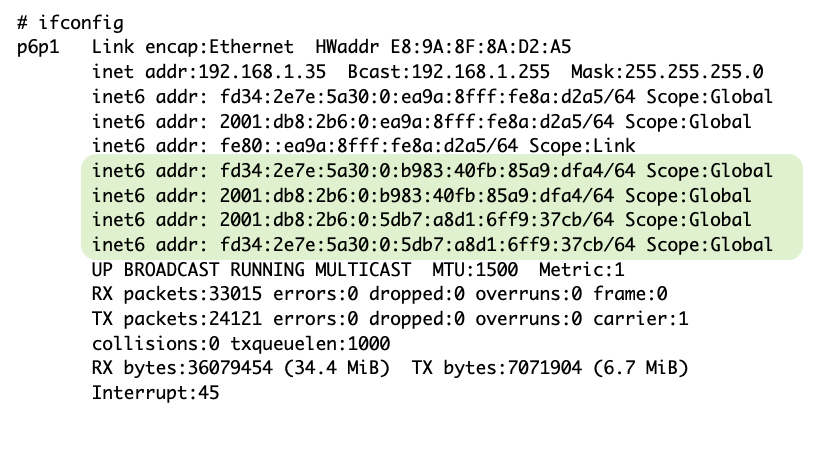
IPv6 Privacy extensions macOS
#  more /etc/sysctl.conf
net.inet6.ip6.use_tempaddr=1
IPv6 Privacy extensions macOS
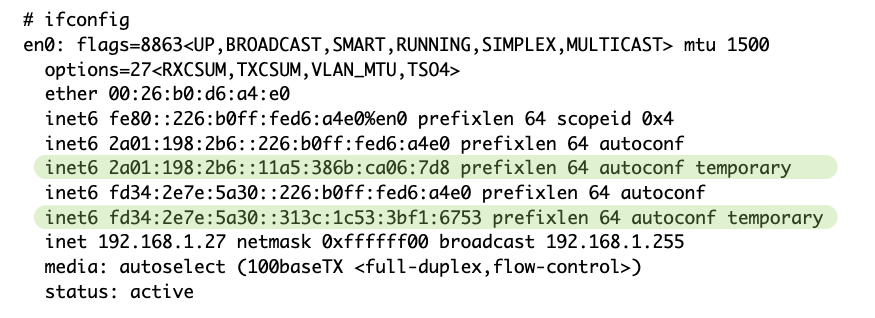
Stable Privacy-Enhanced Addresses
Stable Privacy-Enhanced Addresses
- RFC 7217 “A Method for Generating Semantically Opaque Interface
Identifiers” (April 2014) defines a method to create random
host-ids that are
- Different (random) for every network
- Stay stable over time for each network
- Supported by MacOS, Windows 10+, "Desktop" Linux Systems (NetworkManager/Systemd-Networkd)
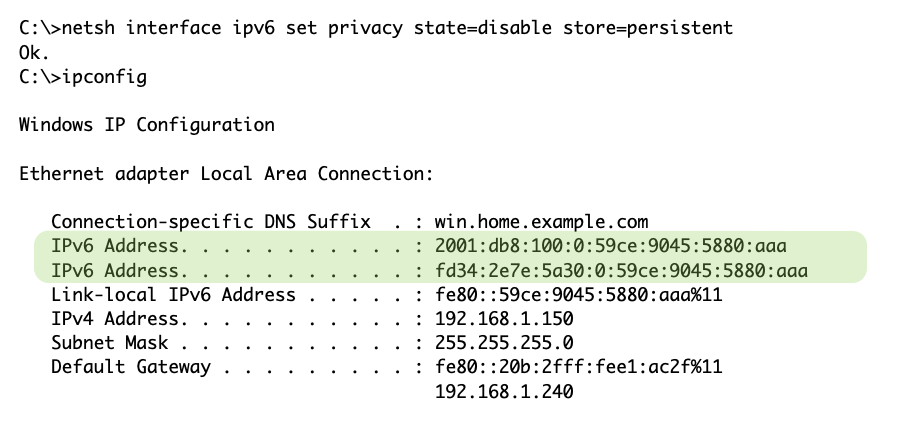
IPv6 Privacy extensions on Windows
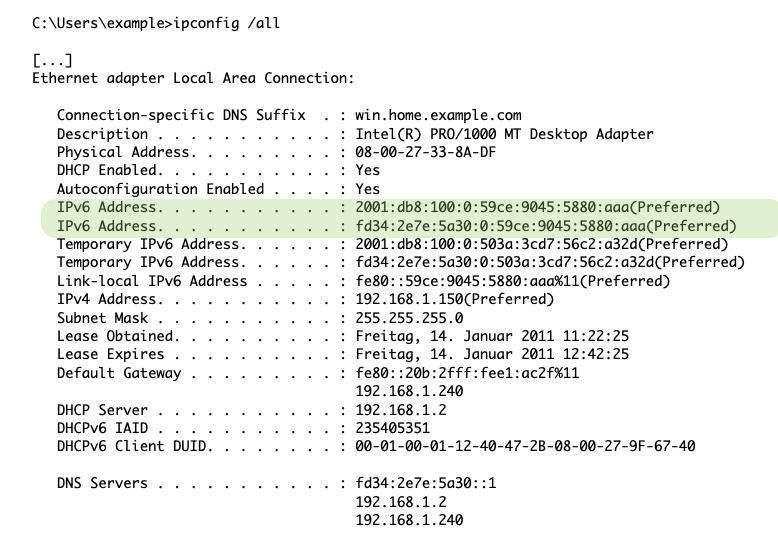
IPv6 Hardware IIDs on Windows Clients
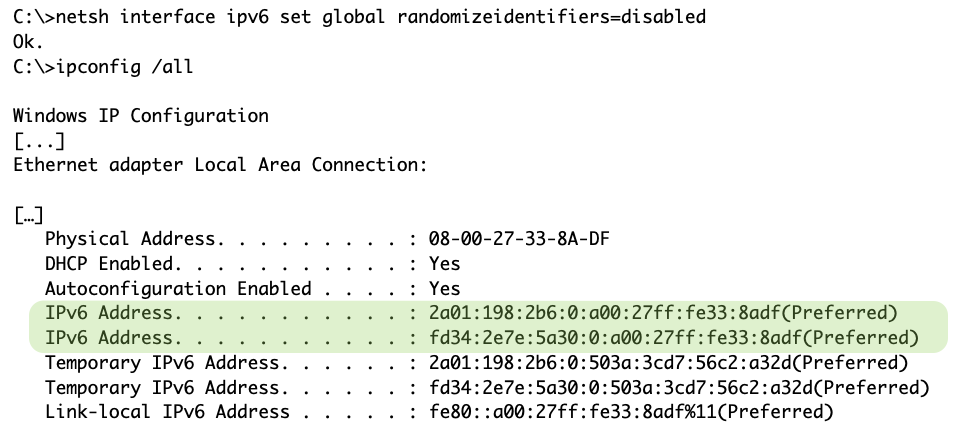
IPv6 Hardware IIDs on Windows Clients
Quiz
- which addresses below are (most likely) not privacy addresses?
2001:db8::5efe:169.254.10.1702001:db8:2b6:0:5db7:a8d1:6ff9:37cbfd34:2e7e:5a30:0:ea9a:8fff:fe8a:d2a52a01:198:2b6::226:b0ff:fed6:a4e0
Questions?