DHCPv6
a different beast than DHCPv4
Carsten Strotmann
Created: 2025-01-30 Thu 09:39
Agenda
- DHCPv6 vs DHCPv4
- DHCPv6 High Availability
- DHCPv6 server
DHCPv6
DHCPv6
- From a birds-eye view, DHCPv6 works the same way as DHCPv4
- In the details, it is very different
- DHCPv6 is not an upgrade to DHCPv4, it is a protocol of its own
DHCPv6 IP based vs. DHCPv4 Layer2/Ethernet based (use of link-local addresses)
- DHCPv6 is solely a Layer 3 protocol
- A DHCPv6 client already has a working link-local IPv6 address
(
fe80::) when sending the first DHCPv6 request - No "low-level kernel trickery" required
- A DHCPv6 client already has a working link-local IPv6 address
(
DHCPv6 protocol (port numbers, communication)
- DHCPv6 Servers and Relay-Agents listen on Port
547(UDPv6) - DHCPv6 clients listen on Port
546(UDPv6)
DHCPv6 multicast usage and addresses
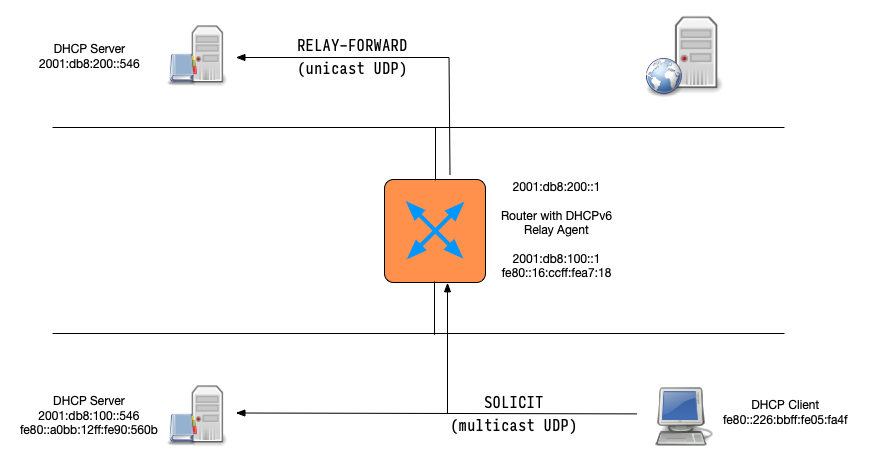
- DHCPv6 clients communicate using link-local multicast addresses
- All-DHCP-Relay-Agents-and-Servers (
ff02::1:2) - All-DHCP-Servers (
ff05::1:3)
- All-DHCP-Relay-Agents-and-Servers (
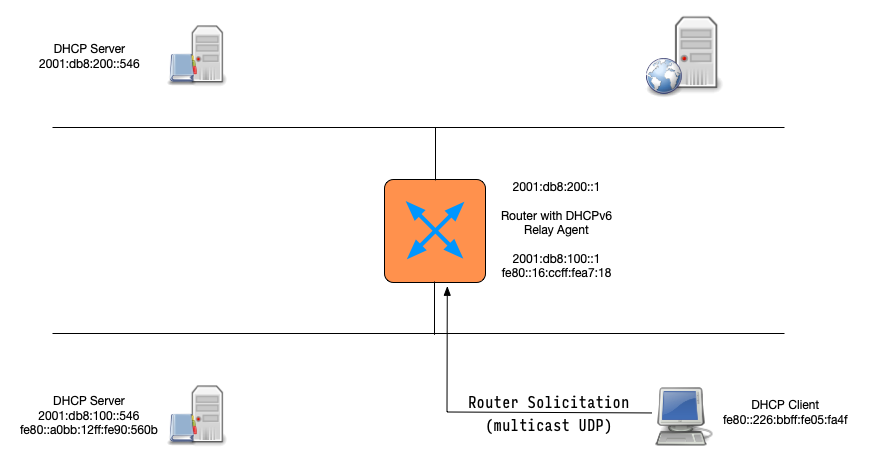
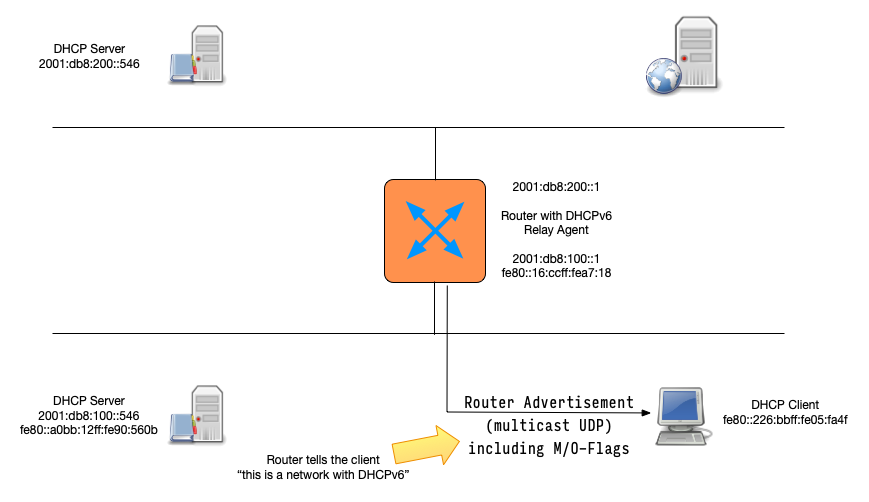
the role of router in DHCPv6
- DHCPv6 has been designed to provide it's service in cooperation
with the local router(s)
- DHCPv6 must be enabled in the router configuration (
M-FlagorO-Flag) - The Default-Gateway Address will be retrieved from a router and not from the DHCPv6 Server
- DHCPv6 must be enabled in the router configuration (
Router and DHCPv6 (1/2)
Router and DHCPv6 (2/2)
DHCPv6 solicit message
DHCPv6 advertise message
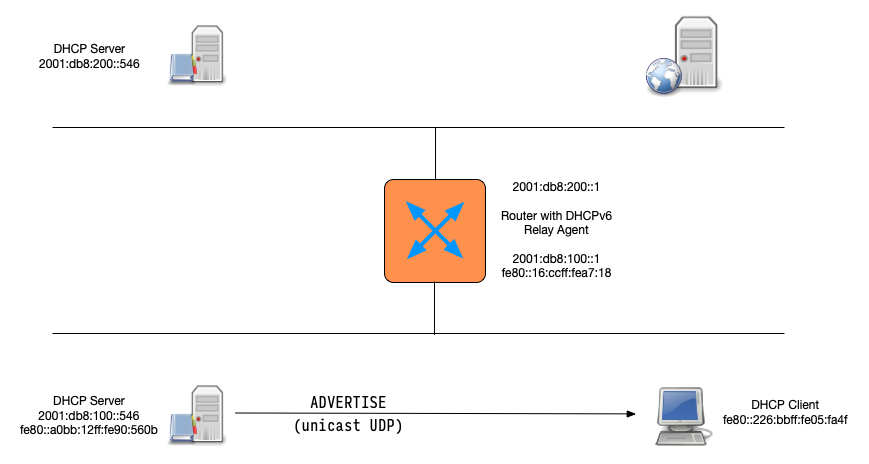
DHCPv6 advertise (via relay)
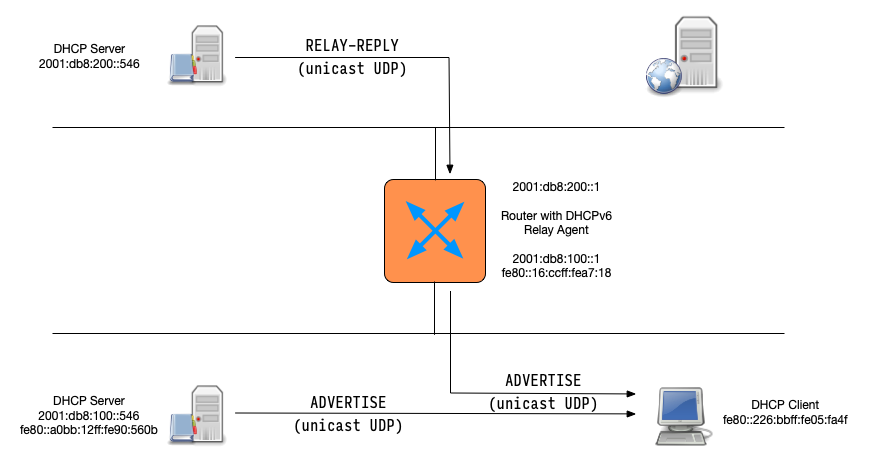
DHCPv6 request
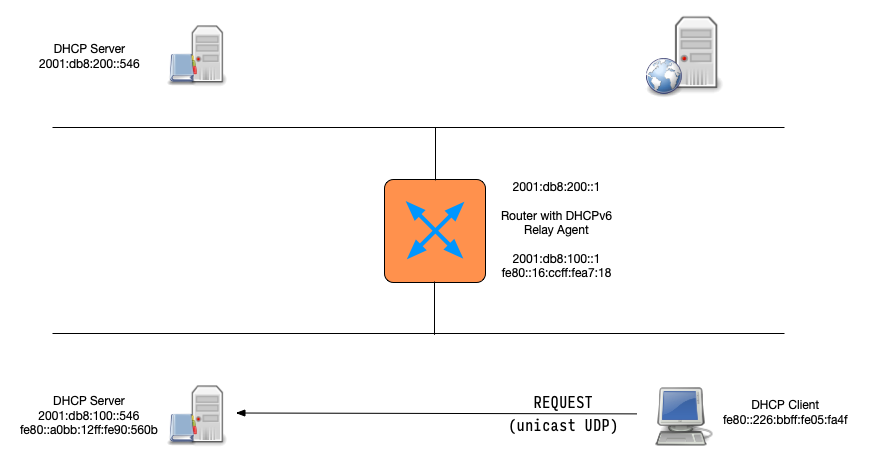
DHCPv6 reply
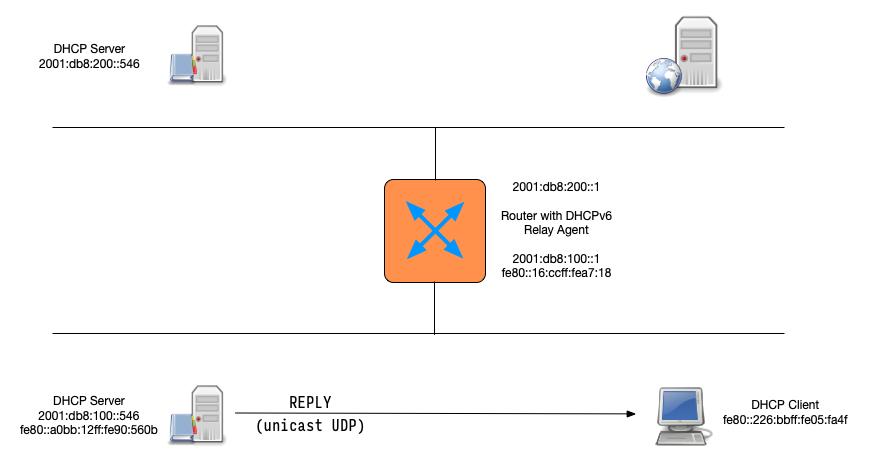
DHCPv6 client assigns new IPv6 address
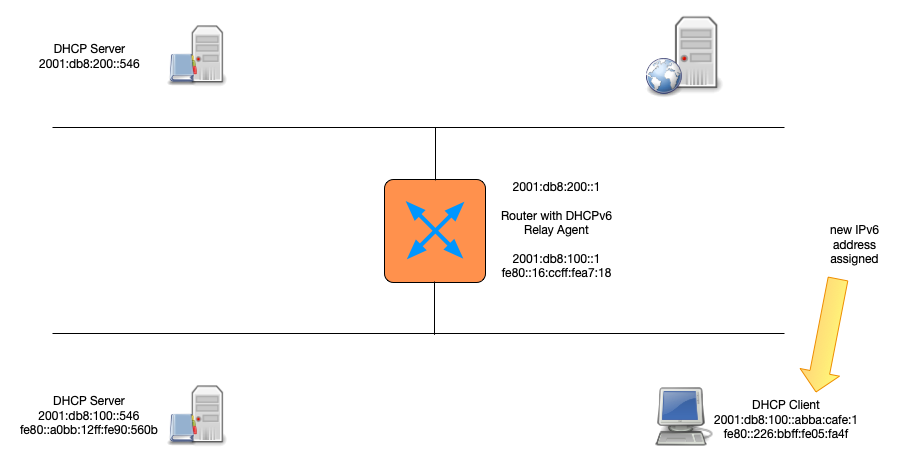
DHCPv6 client states (1/8)
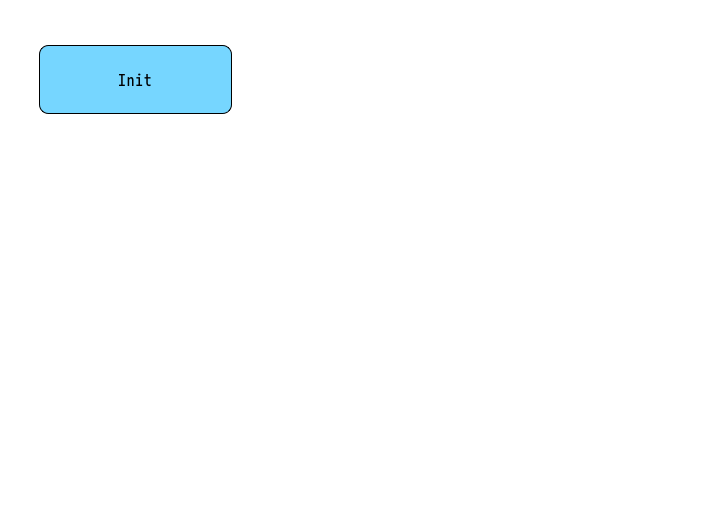
DHCPv6 client states (2/8)
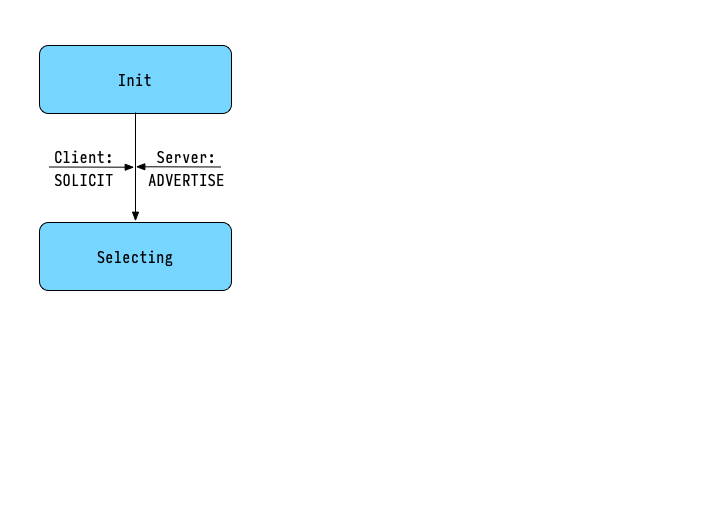
DHCPv6 client states (3/8)
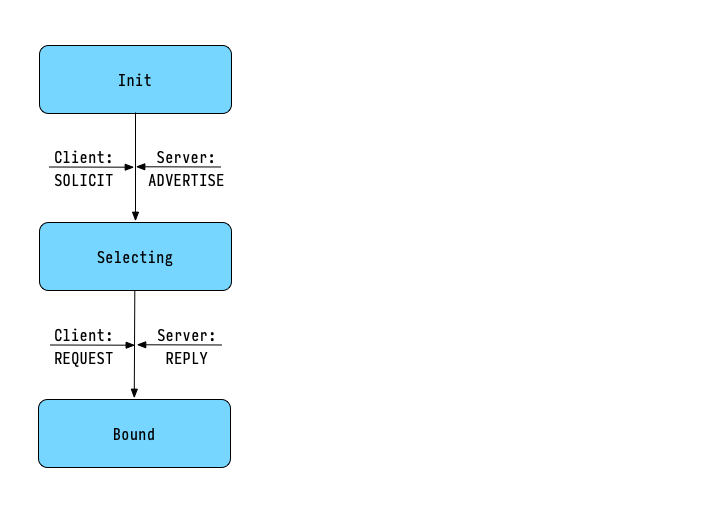
DHCPv6 client states (4/8)
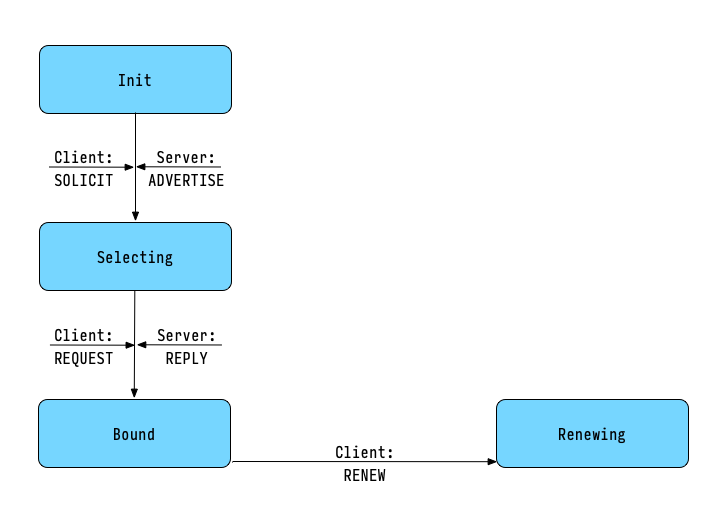
DHCPv6 client states (5/8)
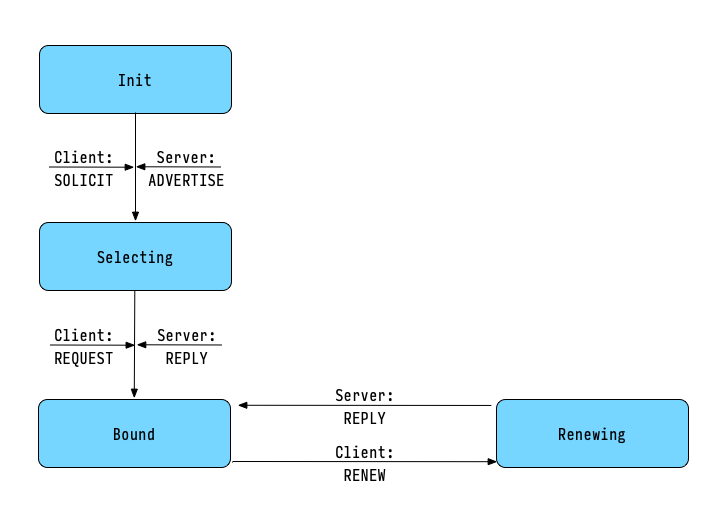
DHCPv6 client states (6/8)
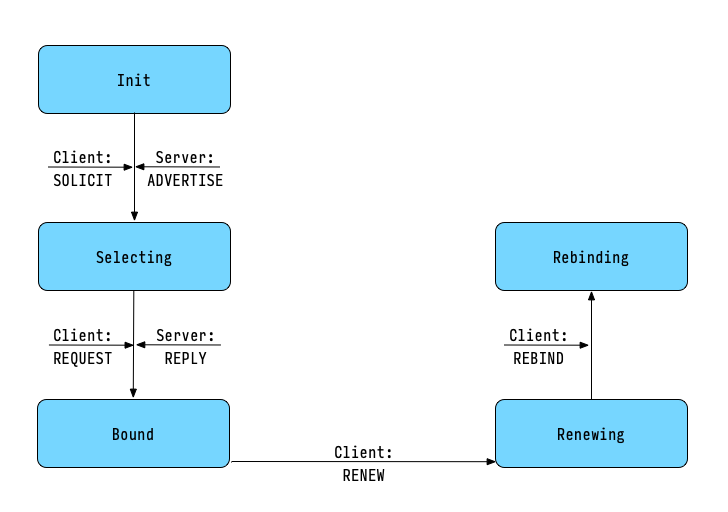
DHCPv6 client states (7/8)
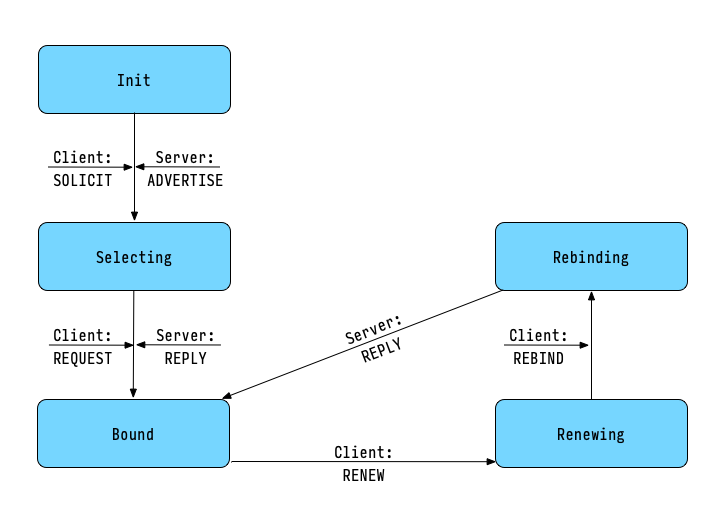
DHCPv6 client states (8/8)
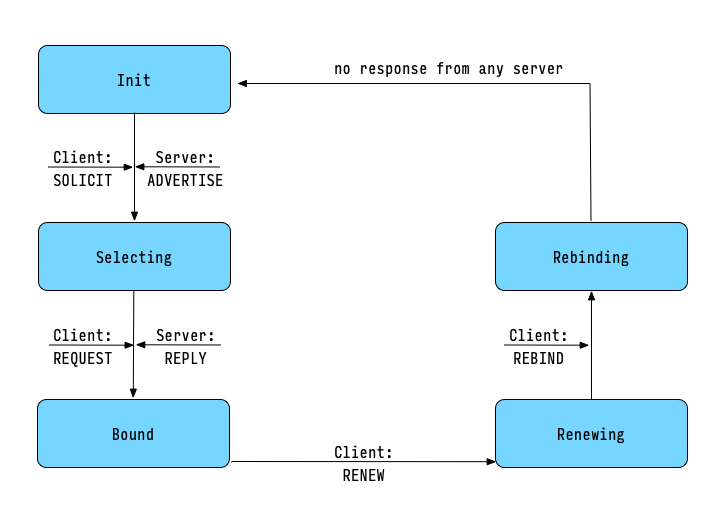
DHCPv6 address allocation vs. DHCPv4 address allocation
- DHCPv6 server must issue IP Addresses randomly from the available
address pool
- Some DHCPv4 server products issue IP Addresses continuously
- The DHCPv6 scheme makes it harder to guess an IP Address or scan a network segment
DHCPv6 allocation types:
- a DHCPv6 client can send different kind of IP address requests
- non-temporary: an address that will always be given to this client if available. This is similar to an DHCPv4 address request.
- temporary: an address that will always change on each request and has a low lease time. Used by the client for outgoing connections for privacy reasons
- multiple: a client can request multiple IP addresses from the DHCPv6 server
- prefix delegation: a client that is a router and also a DHCPv6
server itself can request one or more IPv6 prefix networks from
an upstream DHCPv6 server
- this allows for an hierarchical DHCPv6 configuration
DHCPv6 in combination with SLAAC
- IPv6 support Stateless Automatic Address Configuration aka SLAAC
- SLAAC can be used as an alternative to DHCPv6
- SLAAC and DHCPv6 can be combined
Register Static or SLAAC IPv6 addresses in DHCPv6
- RFC 9686 - Registering Self-Generated IPv6 Addresses Using DHCPv6 (December 2024)
- Supports the use of SLAAC while still maintaining the DHCPv6 servers lease database or logs as an tool to track IP-address assignments
- Client and DHCPv6-Server support currently not available in common operating systems
DHCPv6 - stateless vs. stateful
- There are two different ways to get an IPv6 address for a IPv6 enabled device
- Stateless configuration
- Stateful configuration
DHCPv6 - stateless vs. stateful
- Stateless configuration
- The IPv6 address will be determined without a DHCP Server (IPv6 auto-configuration = SLAAC)
- Stateful configuration
- The IPv6 address will be received from a DHCPv6 Server
- In both cases additional configuration parameters (DNS Server etc) can be retrieved by DHCPv6
Identity Association (IA)
- An Identity Association (IA) is a construct through which a server and a client can identify, group, and manage a set of related IPv6 addresses (or delegated prefixes)
- Each
IAconsists of anIAID(Identity Association ID) and associated configuration information - If a client has more than one network interface, every interface
will be associated with one distinct
IAID
Identity Association (IA)
- DHCPv6 clients can receive temporary and non- temporary addresses
- Temporary addresses are used for communication with outside, untrusted networks (like the Internet)
- Temporary addresses make it difficult to track a client, they are created randomly and change often
- Non-temporary addresses are stable and can be used to track a client machine (non-temporary addresses are used in trusted, internal networks)
- Temporary and non-temporary (stable) IPv6 addresses are managed with the help of IAIDs
DHCPv6 Prefix Delegation
Prefix Delegation
- A DHCPv6 server can distribute whole networks (prefixes) to DHCPv6
clients (Router, DSL-CPEs, downstream DHCPv6 server)
- A DHCPv6 server in the headquarter distributes networks to a network in a subsidiary
- A DHCPv6 server at an ISCP distributes IPv6-Networks to customers CPE (DSL-Router), which in turn will give out IPv6 prefixes for stateless autoconfiguration
Prefix Delegation
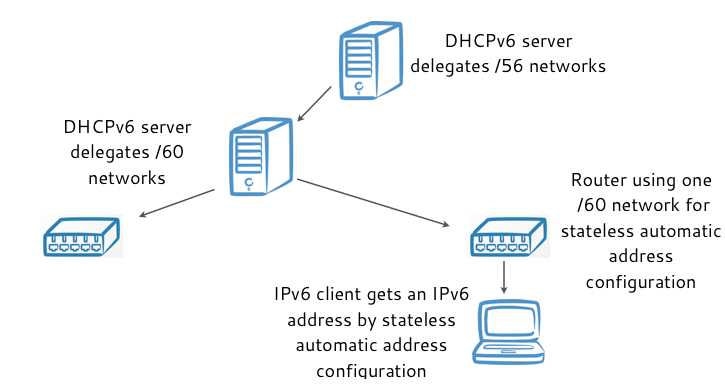
Prefix Delegation
- RFC 9663 - Using DHCPv6 Prefix Delegation (DHCPv6-PD) to Allocate Unique IPv6 Prefixes per Client in Large Broadcast Networks (October 2024)
- Better scalability on large broadcast networks
- Ability to extend the network (sub-devices or IP-Addresses per service on the device)
- USB/Bluetooth-Tethered device behind smartphone on WiFi that does not itself have WiFi capabilities
DHCPv6 rapid commit
DHCPv6 rapid commit
- Rapid commit speeds up the process of joining a network (only one packet exchange)
- With rapid commit there is no information send to the DHCPv6 server
telling the server whether the client is using the advertised IPv6 address
- The DHCPv6 server must reserve the IPv6 address for the full lease time
- This (temporary) squandering of IPv6 addresses is usually not a problem because of the large size of IPv6 subnets (/64 prefixes)
- The DHCPv6 server must reserve the IPv6 address for the full lease time
DHCPv6 rapid commit
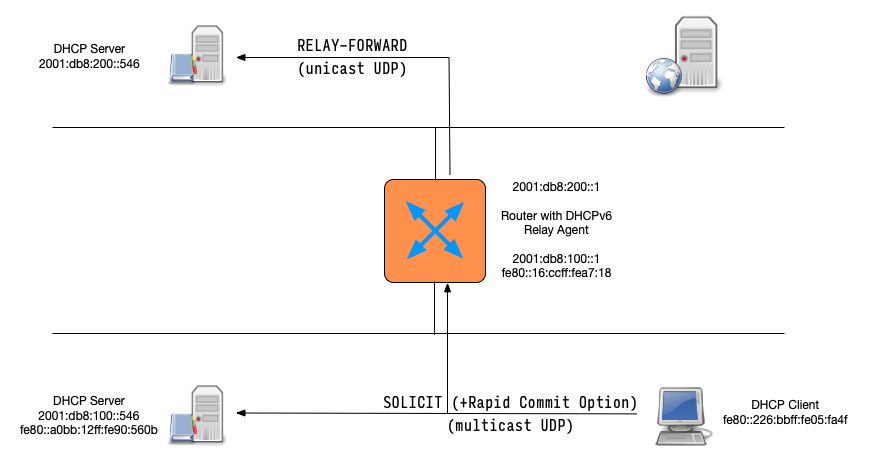
DHCPv6 rapid commit
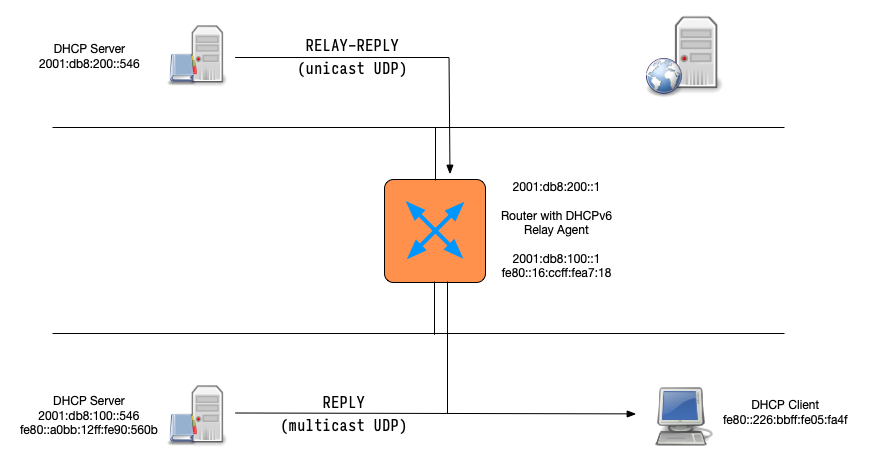
DHCPv6 rapid commit
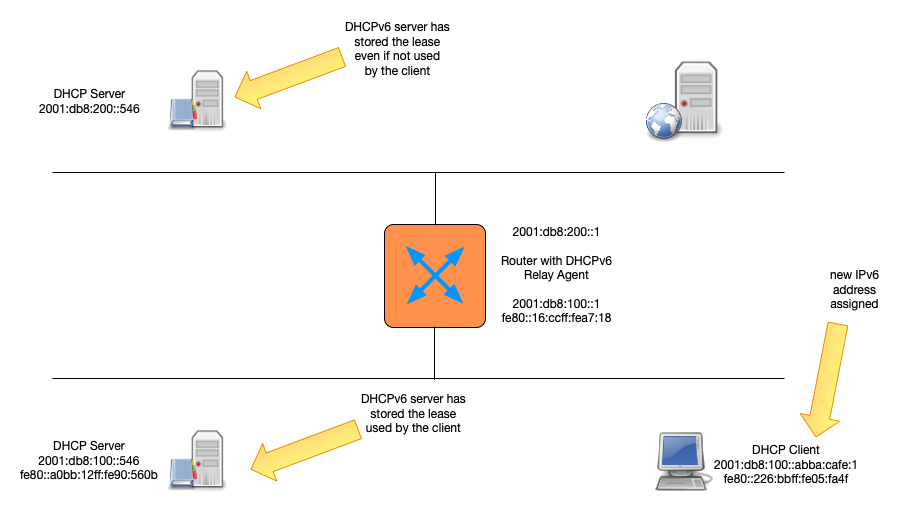
High Availability
DHCP High-Availability
- DHCP is a critical resource in most networks
- If the DHCP service is down, machines and computers cannot join the network
- DHCP administrators like to make the DHCP service redundant and high-available
DHCPv6 Split Pool / Shared Pool
- The DHCPv6 split pool or shared pool HA solution are independent from the DHCPv6 server implementation
- These HA solutions do not require any synchronization between the DHCP server
- These solutions make use of the vast address space available in one IPv6 /64 subnet
- Does not work for DHCPv4, because the address space in IPv4 is too small
DHCPv6 Split Pool
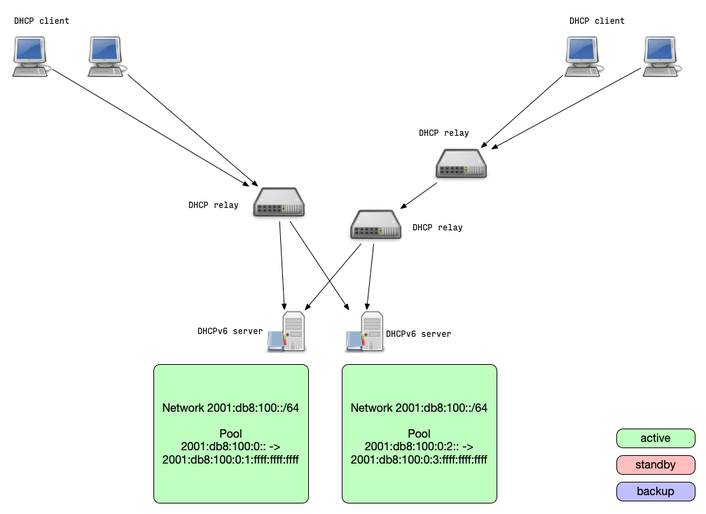
- Split-Pool: because one IPv6 /64 is so large, it usually can be
split in two parts that are served by two independent DHCPv6 servers
- The pools are not overlapping, it is impossible that the two DHCPv6 servers will return the same lease address to different clients
- If one DHCPv6 server stops responding, the clients will receive a new lease from the remaining DHCPv6 server (after lease expiry)
DHCPv6 Split Pool
DHCPv6 Shared Pool
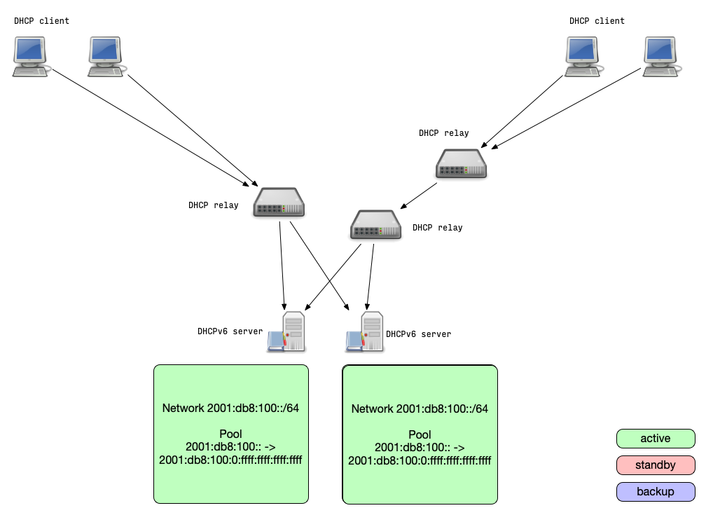
- Shared-Pool: two DHCPv6 server are authoritative for the same
addresses from a pool
- For the shared pool setup, the DHCPv6 servers should allocate new IPv6 addresses non-continuously (random, hash-based etc)
- Because of the size of one IPv6 /64 subnet, the chance that both servers give out the same address to different clients is statistically very low
- And if they did, IPv6 duplicate address detection (DAD) will cover this rare edge case
- If one DHCPv6 server stops responding, the clients will receive a new lease from the remaining DHCPv6 server (after lease expiry)
DHCPv6 Shared Pool
IPv4/IPv6 pure static DHCP
- The pure static solution also works with any DHCP server, in IPv4
and IPv6 networks
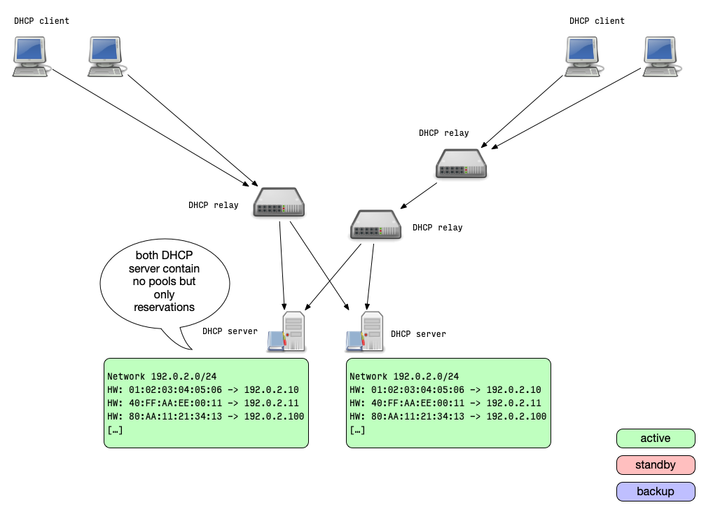
- The idea is to not use dynamic allocation of addresses, but only static reservations
- Two or more DHCP server are equipped with the same reservation configuration
- Each server will always return the same IP address lease to the same client
- This solution requires an out-of-band synchronization of the
reservation
- This could be done on the database level with a shared host reservation database
IPv4/IPv6 pure static DHCP
IPv4/IPv6 shared database
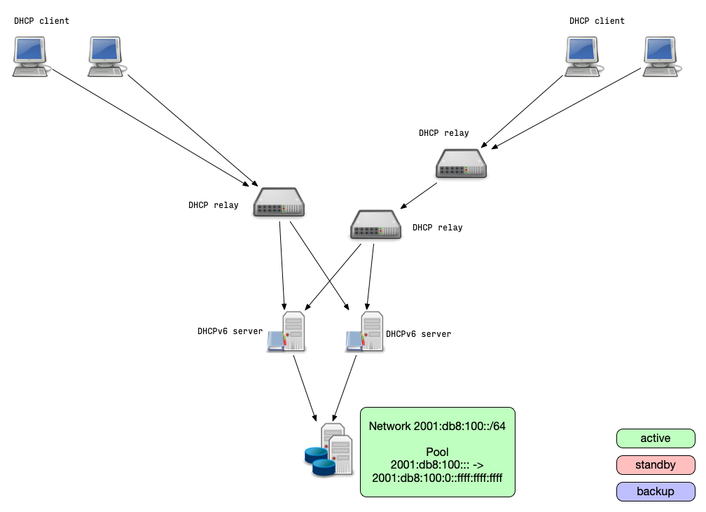
- The shared database solution moves the redundancy to the database
level
- This solutions allows high availability with more than two DHCP server nodes
- Two or more DHCP server are connected to the same (logical) database containing the lease information
- The database itself should be made high available
- All DHCP servers read and write lease information from/to the same database
- Database locking can lead to performance degradation(!) on high rate of leases/renewals
IPv4/IPv6 shared database
Kea DHCP - High Availability Hook
- Using the Kea DHCP High-Availability extension (HA hook) is the most feature rich high availability solution
- The HA hook offers different operation modes
- Load-balancing: all DHCP server are active and return leases
- Hot-standby: all DHCP server are in sync but only one is active and returns leases
- Passive-backup: one DHCP server is active and send lease database updates to a number of backup servers.
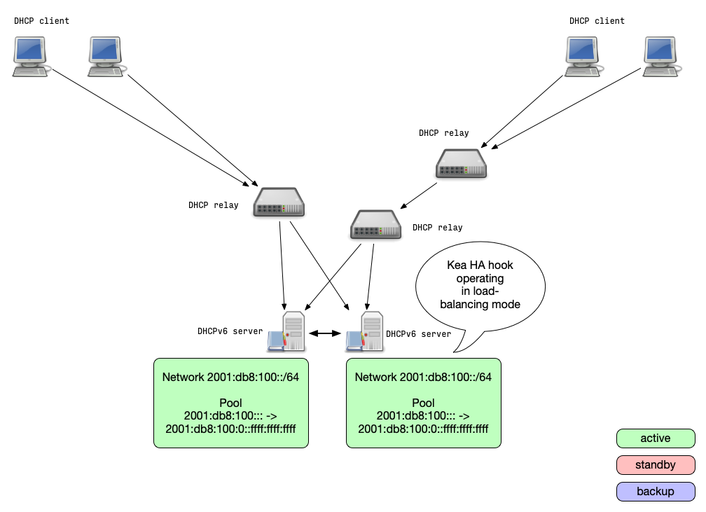
Kea HA Mode: load-balancing
- When operating in load-balancing mode, two Kea DHCP server are
active and respond to lease requests
- The lease information is synced between the Kea DHCP HA servers
- The pools are split 50/50 between the two DHCP servers
- Every DHCP server can take over the full service if needed
- Via the HA protocol a DHCP HA node will detect if one partner
node is down and takes over the service
- once the partner is online again, the lease database is synced
Kea HA Mode: load-balancing
Kea HA Mode: hot-standby
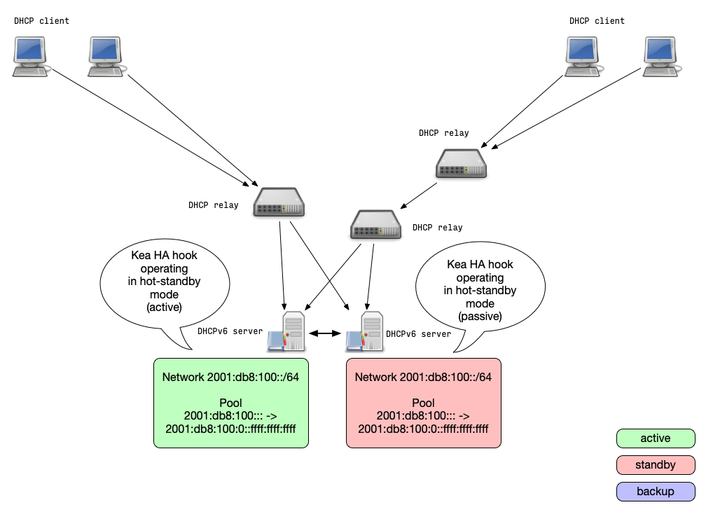
- A Kea DHCP cluster configured for the hot-standby mode will have
the primary node serving DHCP clients and another node (secondary)
only receiving the lease-database updates, but not serving clients
- If the secondary server detects the failure of the primary, it starts responding to all DHCP queries
Kea HA Mode: hot-standby
Kea HA Mode: Backup Servers
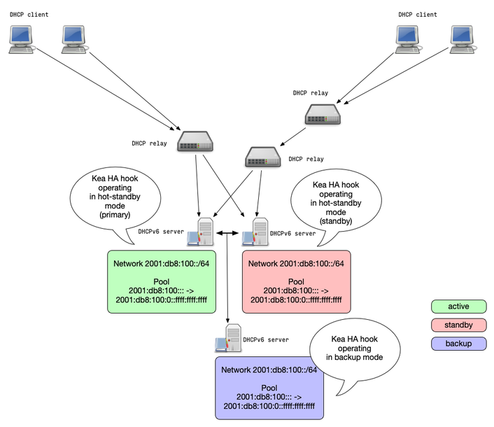
- Kea DHCP supports any number of backup servers
- Backup server receive lease database updates but are not an active part of an HA setup
- Backup server can be deployed in addition to the other Kea HA modes
Kea HA Mode: Backup Server
Kea HA Mode: passive-backup
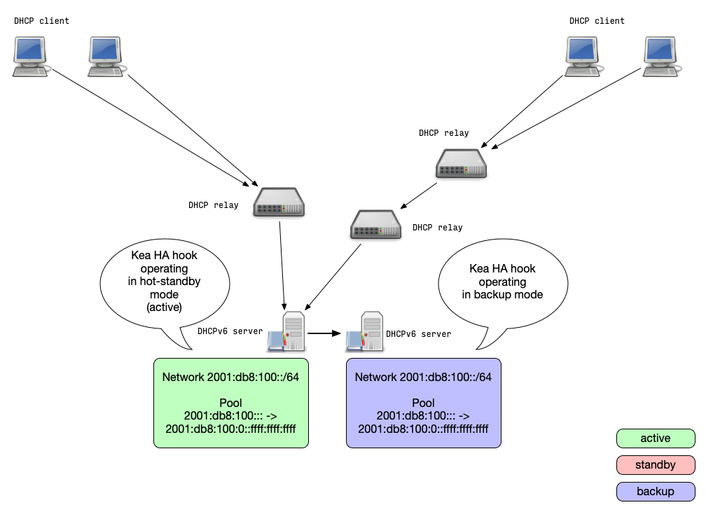
- In the passive-backup configuration, only one Kea server is
active and is serving leases to the clients
- Any number of passive (not answering to clients) backup servers receive lease database backups
- Since Kea 1.7.8, the active server does not need to wait for a
lease update confirmation from the backup servers before giving
the lease to a client
- this reduces the latency compared to the other HA modes
- In case of an failure of the active server, a backup server needs
to be manually promoted to be active
- This could be automated outside of Kea with API calls from a monitoring system
Kea HA Mode: passive-backup
DHCPv6 Server
ISC DHCPv6
- the ISC DHCP server supports DHCPv6 since Version 4.0.0
- Source: http://isc.org
- License: BSD
- The ISC DHCP Server is deprecated and development has stopped
- The last version of the ISC DHCP server is 4.4.3 (March 2022)
Kea DHCPv6
- ISC KEA DHCP is the successor of ISC DHCP
- It was designed for DHCPv6 (and DHCPv4) from the beginning
- Supports modern standards like DHCPv4-over-DHCPv6
- HA Support for DHCPv6 (and DHCPv4)
- Website: https://kea.isc.org/
Microsoft DHCP Server
- DHCPv6 since Windows Server 2008R2
- License: Microsoft EULA
- Information: https://blogs.technet.com/b/teamdhcp/
- HA via Microsoft Server Cluster
Dibbler DHCPv6
- DHCPv6 Server for Linux, macOS and Windows XP/2003
- Current version: 1.0.1 (2015)
- License: GNU GPL v2
- Source: https://github.com/tomaszmrugalski/dibbler
- The developer of this DHCPv6 server (Tomasz Mrugalski) now works for ISC on the KEA DHCP Server
- Development is halted, the project currently has no active maintainer
WIDE DHCPv6 Server
- Was the first available DHCPv6 server
- Has been part of the KAME project (IPv6 for BSD Unix)
- License: BSD
- Source: https://sf.net/projects/wide-dhcpv6/
- development has stopped
dhcpy6d
- DHCPv6 server written in Python
- Current release: 1.6.0 (July 2024)
- License: GPL-2.0
- Source: https://github.com/HenriWahl/dhcpy6d
- Actively maintained
- Easy to extend (Python)
- MAC address aware
Udhcpc
- DHCPv4/DHCPv6 server for embedded systems, part of BusyBox
- License: GPL
- Current release: BusyBox 1.37.0 (September 2024)
- Source: https://busybox.net/
Jagornet DHCP Server
- An open source DHCPv4/DHCPv6 Server in Java
- License: GPLv3
- Current release: 4.0.1
- Source: https://www.jagornet.com
- Features: HA, dynamic DNS, multithreaded architecture, flexible XML/JSON/YAML configuration file format
CoreDHCP
- Fast, multithreaded, modular and extensible DHCP server written in Go
- License: MIT
- Source: https://coredhcp.io/
- Modular design, possible to extend with plugins
- Work in Progress
DHCPv6 in Router Hardware
Many IPv6 router devices from vendors like Cisco or Juniper include DHCPv6 server.
Questions